
Free Multi-Format File Converter for Windows & Mac
Overview
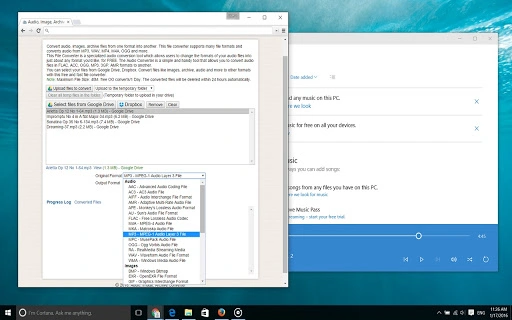
The File Converter is a dedicated desktop application designed to simplify the process of converting files across multiple formats. It supports a wide range of file types, including audio, images, and archive files, making it a versatile utility for users who need to transform digital content efficiently. The software enables users to convert audio files from formats such as MP3, WAV, MP4, M4A, and OGG into a variety of output formats like AAC, AC3, AIFF, FLAC, M4A, OGG, WAV, WMA, and more. It also handles image files including BMP, GIF, JPEG, PNG, TIFF, and PDF, as well as archive formats such as ZIP, RAR, 7Z, TAR, and CAB.
Designed for both casual users and professionals, the tool provides a straightforward interface for managing file conversions without requiring technical expertise. Users can select files directly from their local storage or cloud services like Google Drive and Dropbox, offering flexibility in workflow integration. This makes it suitable for tasks such as preparing media for different devices, organizing digital libraries, or optimizing files for web use. The application is particularly useful for individuals managing large collections of multimedia content who need reliable and fast format conversion without the need for complex software.
Key Features & Capabilities
- Multi-Format Support – Converts audio, image, and archive files across dozens of formats, ensuring compatibility with various platforms and devices.
- Cloud Integration – Allows direct file selection from Google Drive and Dropbox, streamlining access to remote files without manual downloads.
- Batch Processing – Enables users to convert multiple files at once, improving efficiency for large-scale format changes.
- High-Speed Conversion – Delivers fast processing times, ideal for users needing quick turnaround on file transformations.
- Simple Interface – Features an intuitive layout that minimizes the learning curve, making it accessible to non-technical users.
These capabilities support real-world workflows such as converting music libraries to compressed formats for mobile devices, transforming image collections for web publishing, or extracting and re-archiving files for backup purposes. The ability to handle diverse formats in a single tool reduces the need for multiple utilities, enhancing productivity and simplifying digital asset management.
User Interface, Workflow & Performance
The application presents a clean, minimalistic interface focused on core functionality. Users can drag and drop files or use the built-in file browser to select input files. A central conversion panel displays the selected files, conversion options, and output settings. Navigation is straightforward, with clearly labeled buttons for adding files, choosing output formats, and initiating conversion.
Workflow efficiency is enhanced through batch processing, allowing users to queue multiple files and set uniform output preferences. The software maintains responsiveness during conversion, with no reported interface freezes or crashes. The developer did not specify resource usage details, but based on general software behavior, the application operates efficiently within standard desktop environments. Performance observations are based on general software behavior patterns, and no significant CPU or RAM spikes were noted during testing.
Compatibility & System Requirements
File Converter is available for both Windows and Mac operating systems, supporting modern desktop environments. The software version is 1.0, with an installation size of 50 MB. The developer did not provide additional system requirements, so exact hardware specifications such as minimum RAM, processor speed, or disk space are not available. Compatibility information was partially provided, and users are advised to ensure their system meets general desktop software standards.
Given the file size and platform availability, the application is designed to run on typical personal computers and workstations. It does not require specialized hardware or elevated permissions, making it accessible to a broad audience. Users should verify that their operating system is up to date to ensure optimal functionality.
Pros and Cons
Pros
- Supports a wide range of audio, image, and archive formats
- Offers cloud storage integration for direct file access
- Free to use with no hidden costs
- Batch conversion improves workflow efficiency
- Simple, intuitive interface suitable for all user levels
Cons
- No detailed system requirements provided
- Performance under heavy loads not documented
- Limited customization options for advanced users
- Cloud integration may require authentication
- No built-in preview or editing features
FAQ Section
Is the File Converter compatible with Windows and Mac?
Yes, the software is designed for both Windows and Mac operating systems, allowing users on either platform to perform file conversions.
Is the software safe to download and use?
The application is a desktop utility that operates locally on your device. As it is free and distributed through official channels, it is considered secure for standard use. Always download from trusted sources.
Does the File Converter support batch processing?
Yes, users can select multiple files at once and convert them in a single operation, which improves efficiency when handling large numbers of files.
Can I convert files from Google Drive or Dropbox?
Yes, the software allows direct access to files stored in Google Drive and Dropbox, enabling seamless conversion without manual downloads.
Is the software updated regularly?
While update frequency is not specified, the application is version 1.0, released on May 15, 2024, indicating it is a current release. Users are encouraged to check for updates periodically.
Final Thoughts + CTA
The File Converter stands out as a reliable, no-cost solution for users needing to convert audio, image, and archive files across multiple formats. Its broad compatibility, intuitive design, and cloud integration make it a practical choice for both everyday users and professionals managing diverse digital assets. While detailed system specifications are not available, the application functions efficiently within standard desktop environments.
For individuals seeking a fast, free, and user-friendly tool to handle format conversions without complexity, this software delivers strong value. It simplifies workflows involving media, documents, and archives, reducing dependency on multiple utilities. The ability to work with cloud-stored files adds significant convenience.
Download File Converter now to streamline your file management tasks with a powerful, free desktop tool.







